Find products to sell
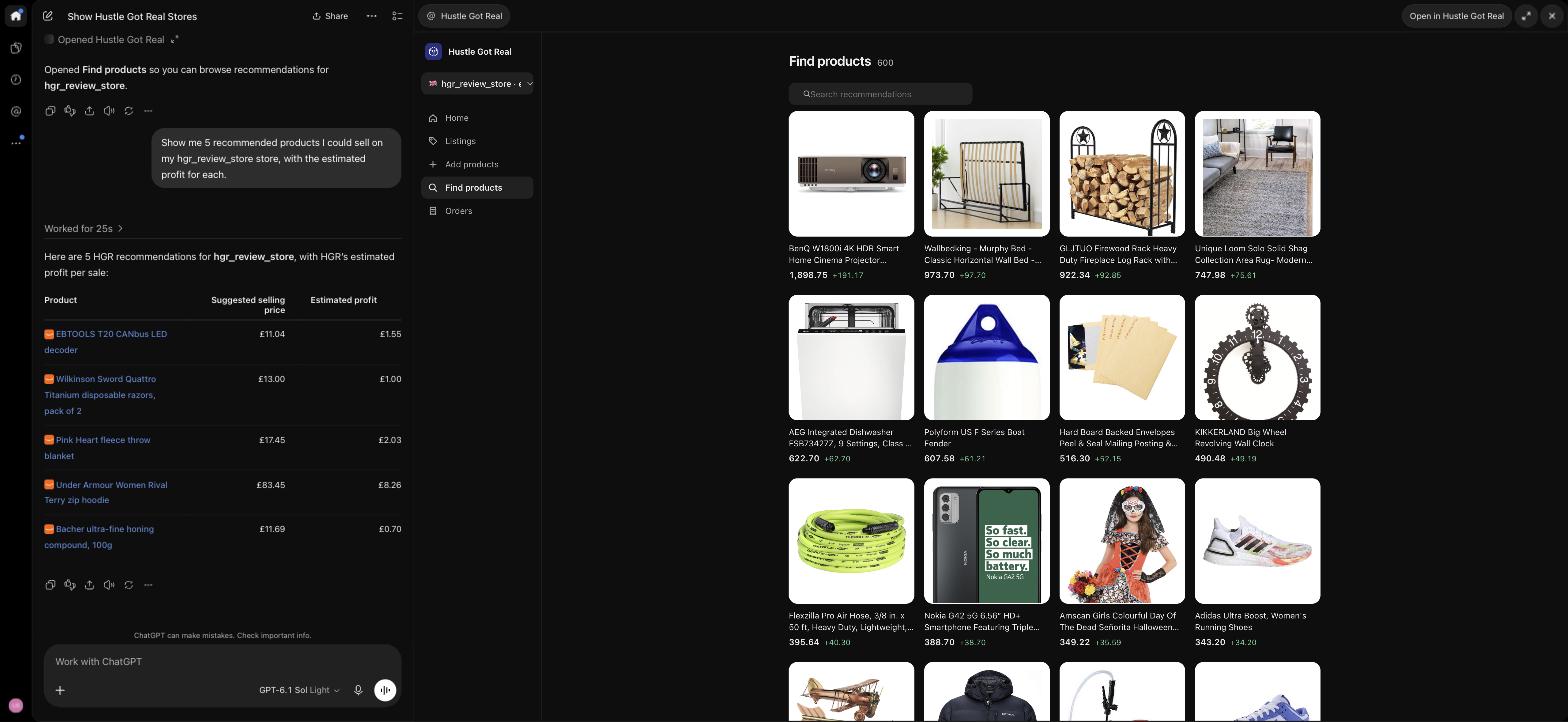
Browse HGR recommendations with supplier prices, suggested selling prices and estimated profit. Check which suppliers HGR supports for your store’s country.
Use ChatGPT for dropshipping with HGR. Find products, add and update listings, and check sales from your connected store.
An HGR account and connected store are required.
Connect your HGR account to work with your own stores, products and orders. Ask a question or open the product screens inside the conversation.
Browse HGR recommendations with supplier prices, suggested selling prices and estimated profit. Check which suppliers HGR supports for your store’s country.
Choose recommended products or paste supported supplier product links. Confirm the products and store, then publish them or keep them pending for review.
Review active, pending and ended listings. Request changes to a specific listing’s price, quantity, title, markup or notes. Publish a pending item or hold it for manual review.
Check selling prices, supplier costs and stock. Look at price or stock history for an individual listing or variation to understand what changed.
See sales totals by day, week or month for a date range. Review recent order statuses or look up an order by its marketplace reference.
Ask for a read-only review of low-stock listings, items waiting to publish, recently ended listings, orders and sales. Use the findings to decide your next step.
Ask HGR to open the store manager inside ChatGPT. Browse product images, switch between listing states, explore the catalog, add supplier links and view recent orders.
“Open my HGR store manager.”
Start with a question about your store. Here are three things to try.
Explore product recommendations and compare estimated profit before choosing what to list.
“Show me 5 products with estimated profit.”
Review a specific listing and request a price, quantity or title change.
“Set listing [ID] to £24.99.”
Review your recent orders and sales without switching between screens.
“Show my sales and orders for the last 7 days.”
Search for the plugin by its full name: Hustle Got Real.
Open Plugins in ChatGPT and search “Hustle Got Real”.
Select the plugin labeled “Hustle Got Real · Run your dropshipping store”.
Sign in to HGR and authorize the connection. Make sure your marketplace store is connected in HGR, then ask your first question.
New to Hustle Got Real? Get started with HGR

Review the proposed listing change and approve it before it is applied. Price and stock updates follow HGR’s normal marketplace sync.
The plugin works with the stores connected to your HGR account.
Start with a read-only question. When you’re ready to act, choose exactly what should change.
The plugin uses the stores connected to your HGR account. If you manage several, name the store you want to work on before asking for a report or a change.
Browsing products and checking reports are read-only. Adding products, editing listings, publishing pending items and holding them for review require your confirmation.
Accepted updates follow HGR’s normal marketplace sync. New listings can take time to process, and your account’s listing quota and settings still apply.
Connect or reconnect marketplace stores in HGR. Continue using your HGR dashboard and existing workflows for account settings, billing and order fulfilment.
Explore dropshipping with AI through ChatGPT, a compatible MCP client or HGR’s built-in AI Agent. Choose the experience that fits your workflow.
Yes. Create an HGR account, connect your marketplace store in HGR, then connect the Hustle Got Real plugin in ChatGPT.
Yes. Connect the Hustle Got Real plugin to work with your store’s product recommendations, active, pending and ended listings, orders and sales. Adding products and changing listings require your approval.
Listing changes require your approval. Updates reach your marketplace through HGR’s normal sync, so a change may not appear there immediately.
The plugin lets you work inside ChatGPT. HGR MCP connects compatible clients such as Codex and Claude. The HGR AI Agent is the experience inside Hustle Got Real.
You can add products from HGR’s recommended catalog or supported supplier product links. Choose the products and store, then confirm whether to publish them or hold them as pending listings for review.
Yes. Ask HGR to open the store manager inside ChatGPT. It includes a store overview, listings with images, a recommended product catalog, adding products from links and recent orders.
Yes, with the stores connected to your HGR account. Ask to see your stores, then choose the one you want to work on. Name the store when requesting a report or an action so the intended store is clear.
Your normal HGR listing limits still apply. Optional AI rewriting of product titles or descriptions uses your HGR AI tokens. You can add products without requesting AI rewriting.
Check that you connected the correct HGR account and that your marketplace store is connected in HGR. If a store needs reconnecting, reconnect it in Hustle Got Real, then return to ChatGPT.
No. Supplier prices, suggested selling prices and estimated profit help you compare products. They are not promises of sales or final margin; check current costs and fees before listing.
Open ChatGPT, search “Hustle Got Real” in Plugins, and connect your HGR account.
Find HGR in ChatGPT