API Connection Guide - How to Connect Your Store to HustleGotReal's Platform
Complete guide for HGR users to properly connect their store to the Platform's API. Learn how to fix API disconnections, relink channels after password changes, and troubleshoot connection issues.
What is API Connection?
API (Application Programming Interface) connection is the bridge between your selling platform (eBay or Shopify) and HustleGotReal's automation system. It enables automated product listing, inventory monitoring, price updates, and order processing.
A properly configured API connection keeps your dropshipping business running 24/7 without manual work.
Common Issue: API Not Connected / Channel Needs Relinking
Your API connection is missing or broken, or you changed your password and need to relink your channel.
Reconnect/relink your API through channel settings. Follow the step-by-step guide below.
How to Reconnect/Relink Your API
Go to Channel Settings
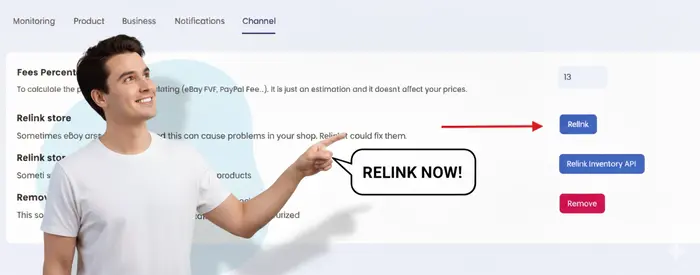
Go to Channel Settings in your HustleGotReal account. Channel Settings
Click "Relink"
Find your disconnected channel and click the "Relink" button.
Click the "Relink" button to reconnect your channel.
Authorize the Connection
You'll be redirected to your platform's login page. Sign in and authorize HustleGotReal.
If you changed your password recently, use the new password.
Confirm Connection
After authorization, you'll be redirected back to HustleGotReal. Your channel status should change to "Connected".
Done! Your API is now connected and ready.
Changed Your Platform Password?
If you changed your password on eBay or Shopify, you must relink immediately. Tokens become invalid after a password change.
Steps after password change:
- Go to Channel Settings in HustleGotReal
- Click "Relink" next to the affected channel
- Log in with your new password when prompted
- Grant permissions again
- Verify the connection is active
Alternative Connection Methods
No-API Server Connection
Keep your business running 24/7. Our No-API Server runs in the cloud, processing orders even when your computer is off. Perfect for Amazon, Facebook Marketplace, and more.
Automates order processing
Keeps your store running 24/7
No complex setup
No-API Extension
Chrome extension that automates actions without API. Works in the background while you browse.
Set up in minutes, no technical knowledge needed.
Troubleshooting Connection Issues
Connection keeps failing
• Clear your browser cache and cookies, then try again.
• Double-check that you are using the correct credentials.
• Confirm your selling account has no holds or suspensions.
API connection shows as disconnected
• Verify your platform password hasn't changed.
• Check if API permissions were revoked on your platform.
• Unlink and relink the channel from HustleGotReal.
Important Notes
•Keep your HustleGotReal subscription active to maintain API connections.
•Always relink channels immediately after changing platform passwords.
•Monitor connection status regularly from your dashboard.
•Multiple channels can connect to a single HustleGotReal account.
•API connections are secure and encrypted for your protection.
Quick Checklist
- Verify credentials and relink after password changes.
- Check channel status is "Connected".
- Confirm listings update (stock/prices).
- Enable automatic tracking on orders.
Need Help?
If you're still experiencing connection issues or have questions about API setup, our support team will help you get connected quickly and efficiently.
Ready to Connect Your Store?
Set up your API connection and start automating your dropshipping business today.
7-Day Money-Back Guarantee